Kubernetes Architecture Explained How It Actually Works
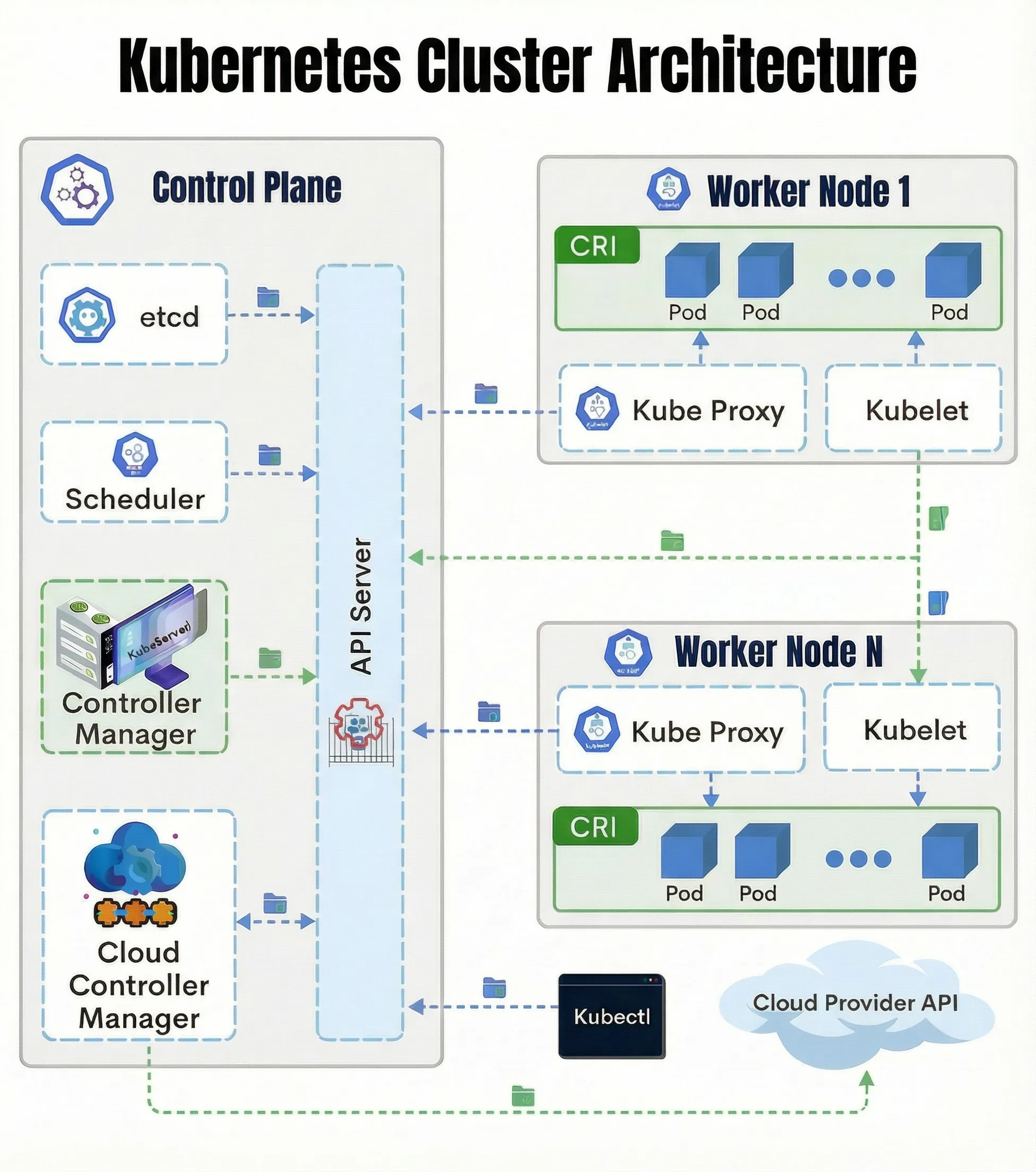
So you’ve heard about Kubernetes, maybe even used it a bit, but when you look at those architecture diagrams, your brain goes “wait, what’s happening here?” I’ve been there. Let me break down how Kubernetes actually works under the hood.
Kubernetes manages your containerized apps across multiple machines. To really get it, you need to understand how the pieces fit together.
The Big Picture
Kubernetes has two main parts:
- Control Plane — The brain that makes decisions
- Worker Nodes — The machines that run your apps
Everything talks through the API Server — it’s the central switchboard. Nothing happens without going through it first.
Control Plane Components
The Control Plane is mission control. It watches everything, makes decisions, and keeps your cluster running. Five key components:
API Server
The front door to your cluster. Every request goes through it:
- Validates and processes requests
- Updates cluster state
- Handles authentication
Think of it like a reception desk — everyone goes through it first. This makes security and debugging way easier.
etcd
The cluster’s memory bank. Stores everything:
- Cluster configuration
- Desired state (“I want 3 copies of my app”)
- Current state
- Secrets and configs
Usually runs on 3-5 nodes for reliability. Only the API Server can access it directly.
Scheduler
The matchmaker. Decides which node should run each Pod by looking at:
- Resource availability (CPU, memory)
- Your rules and constraints
- Data locality
It picks the node but doesn’t start the Pod — that’s the worker node’s job.
Controller Manager
The supervisor that keeps things running correctly. If you want 3 replicas, it makes sure you have exactly 3. If one crashes, it starts a new one. This is Kubernetes’ “self-healing” capability.
Different controllers handle different jobs: nodes, replicas, endpoints, permissions, and more.
Cloud Controller Manager
Only for cloud deployments (AWS, GCP, Azure). Translates between Kubernetes and your cloud provider’s API for things like load balancers, storage, and node management.
Worker Node Components
Where your apps actually run. Each node has three main components:
Kubelet
The foreman on each node. It:
- Gets instructions from the API Server
- Pulls container images
- Starts and stops containers
- Reports status back
The Control Plane says “run this Pod here,” and Kubelet makes it happen.
Kube Proxy
The traffic director. Handles networking:
- Sets up Pod-to-Pod communication
- Implements Services (stable addresses for Pods)
- Load balances across Pod replicas
- Routes traffic around the cluster
CRI (Container Runtime Interface)
Actually runs your containers. Works with Docker, containerd, CRI-O, or any CRI-compatible runtime. It’s an abstraction layer, so you can swap runtimes without changing Kubernetes.
Pods
Where your containers live. A Pod wraps one or more containers that share:
- Network (same IP)
- Storage volumes
- Resource limits
Important: Pods are temporary. They can be destroyed and recreated anytime. Don’t rely on Pod IPs staying the same — use Services instead.
External Components
kubectl
Your command-line tool for everything. Deploy apps, check status, debug, scale — it all goes through kubectl to the API Server.
Cloud Provider API
Your cloud provider’s services (AWS, GCP, Azure). The Cloud Controller Manager uses this to provision load balancers, storage, and nodes.
How Everything Works Together
Here’s what happens when you run kubectl create deployment nginx --image=nginx:
- kubectl sends the request to the API Server
- API Server validates and saves “I want nginx” to etcd
- Scheduler picks the best node
- API Server tells Kubelet on that node to start the Pod
- Kubelet pulls the image and starts the container via CRI
- Kubelet reports back: “Pod is running”
- API Server updates etcd with the new state
All of this happens in seconds. The cluster constantly monitors itself — controllers watch for issues, Kubelet reports health, and Kube Proxy updates network rules as things change.
Key point: Almost everything goes through the API Server. This might seem inefficient, but it makes everything easier to manage, secure, and debug.
Why This Architecture Works
1. Centralized communication — One place for security, debugging, and versioning
2. Declarative model — You say “I want 3 replicas,” Kubernetes makes it happen and keeps it that way
3. Separation of concerns — Control Plane decides, Workers execute. Scale them independently.
4. Self-healing — Controllers automatically fix problems: restart crashed Pods, create missing replicas, reschedule workloads when nodes fail
Quick Reference
| Component | Location | What It Does |
|---|---|---|
| API Server | Control Plane | Central hub for all requests |
| etcd | Control Plane | Stores all cluster data |
| Scheduler | Control Plane | Assigns Pods to nodes |
| Controller Manager | Control Plane | Maintains desired state |
| Cloud Controller Manager | Control Plane | Bridges with cloud services |
| Kubelet | Worker Node | Runs and monitors Pods |
| Kube Proxy | Worker Node | Handles networking |
| CRI | Worker Node | Executes containers |
| Pods | Worker Node | Contains your containers |
Practical Tips
For Developers:
- Design apps to be stateless (Pods can disappear)
- Use Services, not Pod IPs (they change)
- Use Deployments, not bare Pods
For Operators:
- Monitor API Server performance (it’s the bottleneck)
- Back up etcd regularly (it has all your cluster state)
- Make Control Plane highly available
- Watch node resources (CPU, memory, disk)
Troubleshooting:
- Pods won’t start? Check Kubelet logs and API Server connectivity
- Networking broken? Verify Kube Proxy is running
- Scheduling issues? Check Scheduler logs and node resources
- State inconsistent? Check etcd health and Controller Manager logs
Wrapping Up
Kubernetes architecture: Control Plane decides, Worker Nodes execute. The API Server coordinates everything.
Once you understand this, things make sense:
- Why Pods move between nodes
- How Kubernetes knows when to restart something
- Why everything goes through the API Server
- How the cluster keeps itself running
Whether you’re just starting or managing production clusters, this mental model helps you deploy better, debug faster, and make smarter decisions.
The next time you see a Kubernetes architecture diagram, you’ll see the Control Plane making decisions, Worker Nodes doing the work, and the API Server coordinating everything in between.
Happy deploying!