Gminer - Google Maps Business Scraper
What is Gminer?
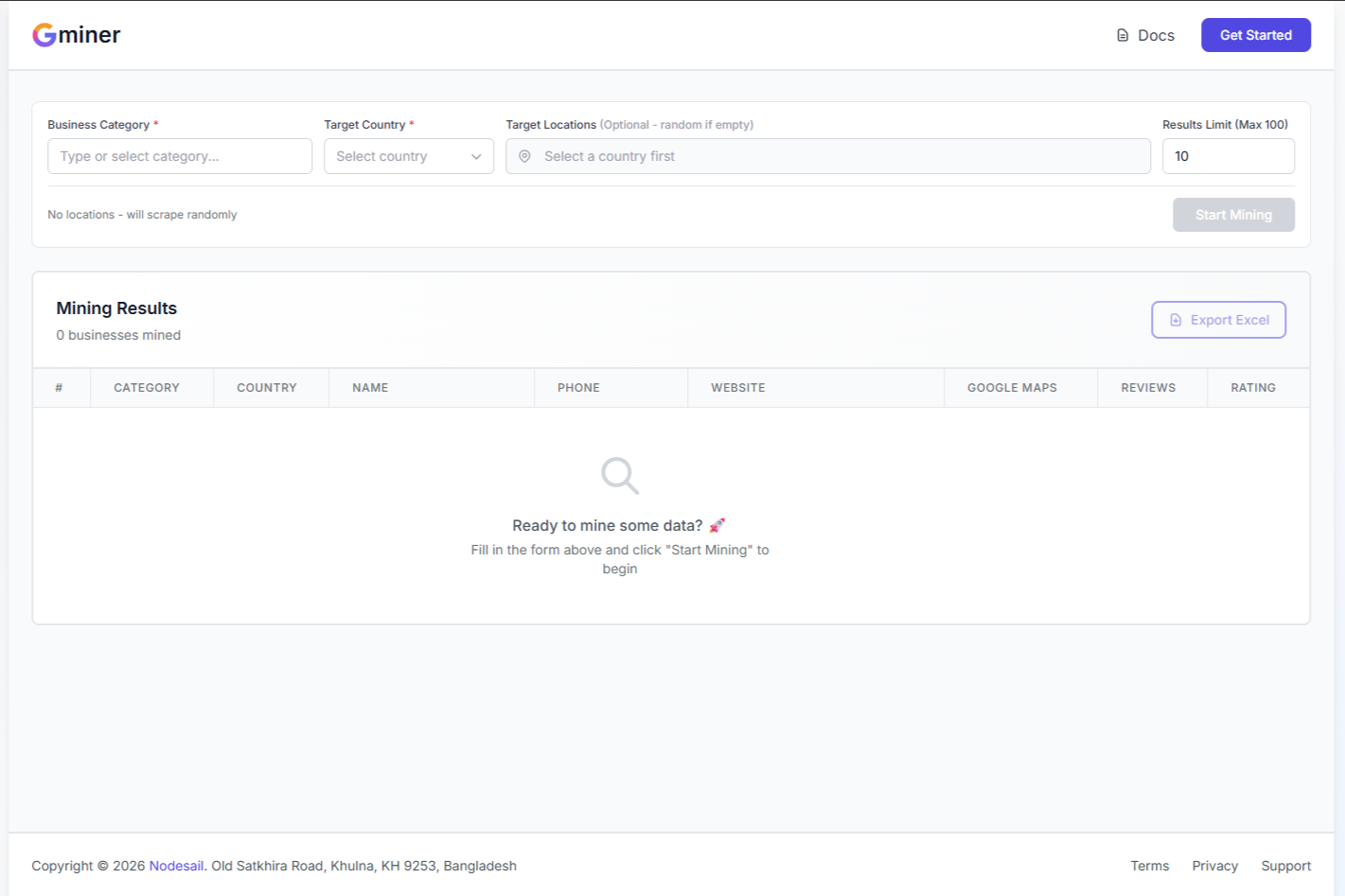
Gminer is a tool that pulls business data from Google Maps. You pick a category and location, and it grabs all the business info for you. Phone numbers, websites, ratings, the whole thing.
It’s made by Nodesail and it’s pretty straightforward to use. No complicated setup or anything.
What You Can Do With It
Find Sales Leads
Need a list of restaurants in New York? Or plumbers in Texas? Gminer gets you that contact info fast. Way faster than manually searching Google Maps and copying stuff.
Research Your Market
Want to see how many competitors are in a city? Check their ratings? See what customers are saying? This tool makes it easy to scope out the competition.
Build Business Directories
If you’re making a directory site or need a database of businesses in a specific industry, Gminer does the heavy lifting. Pick your category and let it run.
How It Works
Using Gminer is pretty simple:
- Login with your account
- Pick a category from 150+ options (restaurants, hotels, gyms, whatever)
- Choose your location by selecting a country and cities
- Set how many results you want (up to 100 per location)
- Click Start Mining and watch it work
- Download the Excel file when it’s done
If you don’t pick specific cities, it’ll just grab random businesses from that country. Sometimes that’s exactly what you need.
What Data You Get
Every business entry includes:
- Business name
- Phone number
- Website URL
- Google Maps link
- Customer rating (the star rating)
- Number of reviews
- Full address
- Category and country
All of this gets exported to an Excel file. Easy to work with, easy to import into your CRM or whatever system you’re using.
Who Uses This?
Sales Teams
If you’re doing cold outreach, you need contact lists. Gminer builds those lists in minutes instead of hours. Pick your target industry and location, export, and start calling.
Marketing Agencies
Agencies use this to find potential clients. Looking for restaurants without websites? Gyms with low ratings? Gminer finds them so you can pitch your services.
Market Researchers
Need to analyze business density in different areas? Compare ratings across cities? Gminer gives you the raw data to work with.
Directory Builders
Building a niche directory site? You need data. Lots of it. Gminer fills your database without manual entry.
The Interface
The tool has a clean interface. Left side is your search form. Right side shows your results in a table. When you’re done, hit the Export Excel button and you’ve got your spreadsheet.
Results show up as they’re being scraped, so you can see it working in real time. Kind of satisfying actually.
Limits and Stuff
You can scrape up to 100 businesses per location in one go. Want more? Just run it again or pick more locations.
The tool works with 150+ business categories. Pretty much any type of business you can find on Google Maps, Gminer can scrape it.
Getting Help
If you get stuck or something breaks:
- WhatsApp: +880 1941 969193
- Email: support@nodesail.com
- Support Portal: support.nodesail.com
They’re pretty responsive from what I can tell.
Is This Legal?
This is publicly available data from Google Maps. Same stuff you could manually copy yourself. Gminer just automates it. But yeah, use it responsibly and follow Google’s terms of service.
Bottom Line
Gminer does one thing and does it well. It scrapes business data from Google Maps. No fancy features, no complicated settings. Just pick what you want and download the results.
If you need business contact info for sales, research, or building directories, this tool saves you a ton of time. That’s really all there is to it.
Website: https://gminer.nodesail.com
Made by: Nodesail
Support: support@nodesail.com