Wavlator - WhatsApp Number Validator
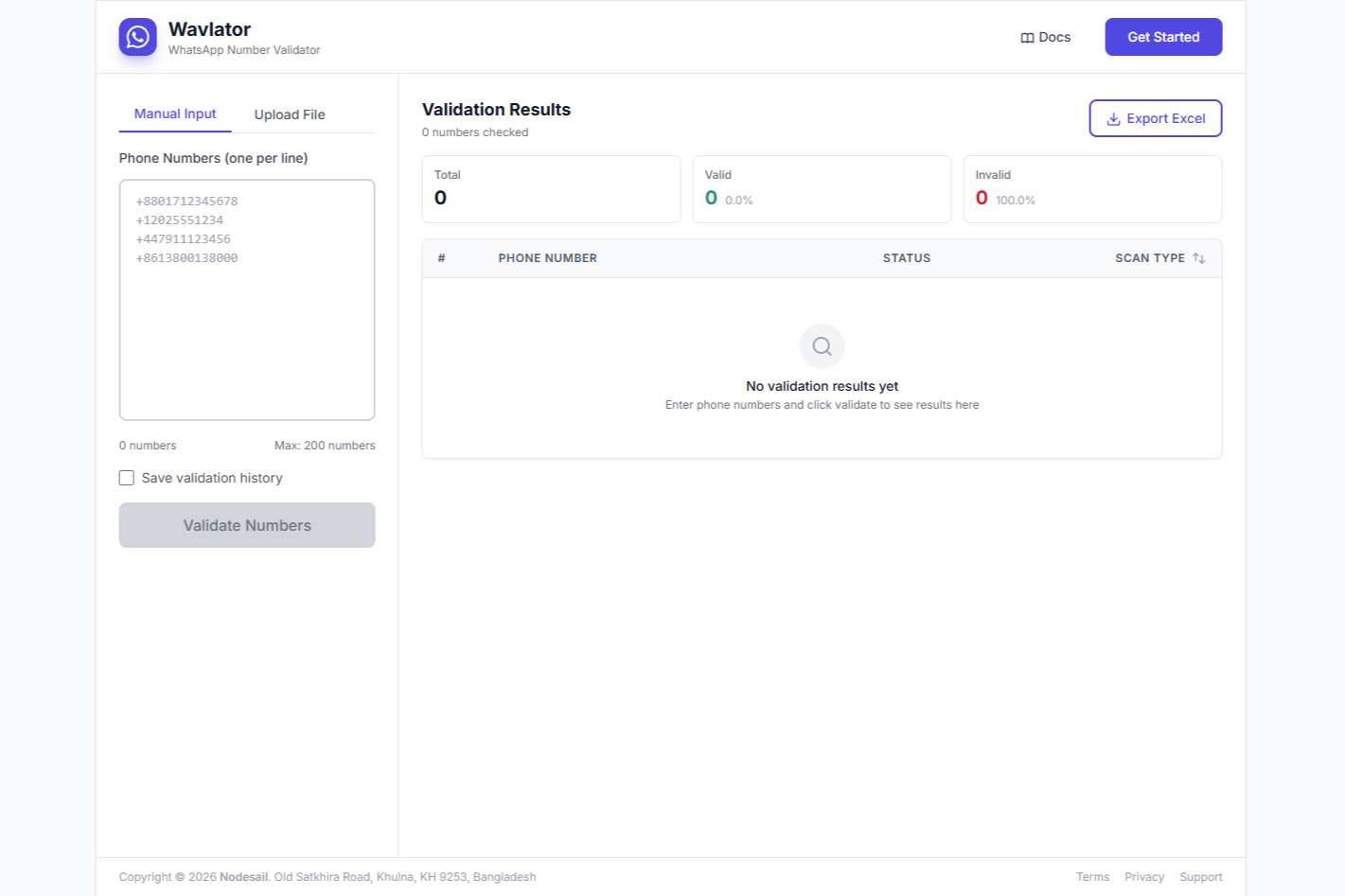
What is Wavlator?
Wavlator checks if phone numbers are actually on WhatsApp. That’s it. You give it a list of numbers, and it tells you which ones are active on WhatsApp and which ones aren’t.
It’s made by Nodesail and it’s pretty useful if you’re doing any kind of WhatsApp marketing or just trying to clean up your contact lists.
Why You’d Use This
Before Running WhatsApp Campaigns
You’ve got a list of 500 phone numbers. How many are actually on WhatsApp? Wavlator tells you before you waste time messaging dead numbers.
Better delivery rates, better ROI. Simple as that.
Cleaning Up Your Database
Old contact lists get messy. People change numbers, stop using WhatsApp, whatever. Run your list through Wavlator and you’ll know which contacts are still good.
Verifying Sales Leads
Got a bunch of leads from somewhere? Check if they’re on WhatsApp before your sales team starts reaching out. Saves everyone time.
CRM Integration
If you’re running a CRM system, you can use Wavlator to keep your data clean. Only valid WhatsApp numbers in your database.
How It Works
Pretty straightforward:
- Get access (you need to request it, more on that below)
- Enter your numbers or upload a file
- Click Validate Numbers
- See the results in real time
- Export to Excel when you’re done
You can validate up to 200 numbers at once. Need more? Just run it again.
Two Ways to Add Numbers
Type Them In
Just paste your numbers into the text box. One per line works. Comma separated works too. The system’s pretty flexible.
It’ll automatically clean up spaces and dashes. And if you paste in something that’s not a valid number format, it filters that out before validating.
Upload a File
Got a big list? Upload an Excel file, CSV, or even a text file. The system pulls out all the phone numbers automatically.
Files can be up to 10MB. That’s a lot of phone numbers.
Number Format
All numbers need to be in international format. That means:
- Start with a + sign
- Include the country code
- No spaces or dashes
Good examples:
- +8801712345678 (Bangladesh)
- +14155552671 (USA)
- +447911123456 (UK)
- +971501234567 (UAE)
Bad examples:
- 01712345678 (missing country code)
- 8801712345678 (missing the + sign)
- +880-171-234-5678 (has dashes)
The system will tell you if your format’s wrong before it even tries to validate.
What You Get Back
Each number gets one of three statuses:
Valid means it’s active on WhatsApp. You can message it.
Invalid means it’s not on WhatsApp or the format’s wrong.
Error means something went wrong during validation. Try again or contact support.
Results and Filtering
After validation, you get a table with all your results. You can:
- Search for specific numbers
- Filter to show only valid or only invalid numbers
- Sort by scan type (new vs re-scanned)
- Export everything to Excel
The Excel export respects your filters. So if you filter to show only valid numbers and then export, you’ll get just the valid ones. Pretty handy for creating clean contact lists.
File Upload Details
Supported file types:
- Excel (.xlsx, .xls)
- CSV (.csv)
- Text files (.txt)
Just put one number per line or row. If you’re using a spreadsheet, put the numbers in the first column. No headers needed, the system figures it out.
History Tracking
There’s a checkbox to save your validation history. Turn that on and you can go back and see what you validated before.
Useful if you’re validating the same lists over time to see which numbers went inactive.
Getting Access
Here’s the thing: you can’t just sign up. You need to request access first.
Contact them through:
- Email: support@nodesail.com
- WhatsApp: +880 1793-601720
- Support Portal: support.nodesail.com
They’ll approve your account and then you can start using it.
Who Uses This?
Marketing Teams
Running WhatsApp campaigns? Validate your list first. You’ll get better delivery rates and won’t waste credits on invalid numbers.
Sales Teams
Before your team starts cold messaging on WhatsApp, make sure the numbers are actually active. Saves time and looks more professional.
Businesses with Customer Databases
Keep your contact lists clean. Run them through Wavlator every few months to remove dead numbers.
Agencies
If you’re managing WhatsApp marketing for clients, this tool helps you deliver better results. Clean lists mean better campaign performance.
Real-Time Results
The validation happens pretty fast. You’ll see results showing up as they’re being checked. No waiting around for everything to finish before you can see anything.
Part of Nodesail
Wavlator is built by the same team that makes Nodesail (the cloud platform). So if you’re already using Nodesail for hosting or other stuff, this fits right in.
Is This Legal?
Wavlator just checks if a number is on WhatsApp. It doesn’t scrape data or violate any privacy rules. It’s the same check that happens when you try to message someone on WhatsApp.
But yeah, use it responsibly. Don’t spam people.
Bottom Line
Wavlator does one job: tells you if phone numbers are on WhatsApp. It’s fast, it handles bulk validation, and it exports to Excel.
If you’re doing any kind of WhatsApp marketing or just want to keep your contact database clean, this tool saves you a bunch of time. No more manually checking numbers or sending messages to dead accounts.
You need to request access to use it, but once you’re in, it’s pretty straightforward.
Website: https://wavlator.nodesail.com
Made by: Nodesail
Contact for Access: support@nodesail.com or WhatsApp +880 1793-601720